How Recurring Tasks Save Time (and Stop Work Going Missing)
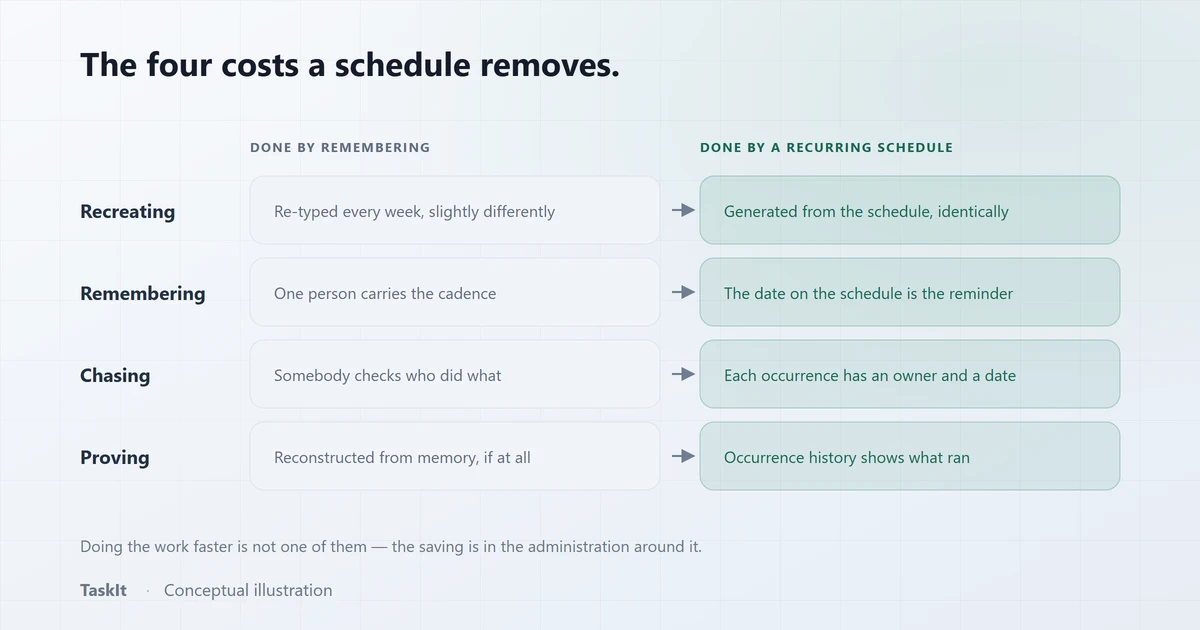
Recurring tasks save time in four places, and doing the work faster is not one of them. They remove the recreating of the same task, the remembering of when it is due, the chasing that follows when nobody remembered, and the reconstruction needed to prove a routine actually ran. In most teams those four together are a larger cost than the routine itself.
In this article
Repeated work costs more than the work
The doing is usually the cheapest part. The expensive parts are the administration wrapped around it, and they are invisible because nobody bills for them.
Take a team with fifteen jobs that repeat every week. The jobs themselves are a known quantity — somebody does them, they take as long as they take. What surrounds them is not:
- Recreating them. Fifteen items re-typed or copy-pasted every Monday, slightly differently each time.
- Remembering them. One person carries the cadence in their head. That is real cognitive load, and it is the first thing to fail in a busy week.
- Chasing them. Because there is no owner and no date, somebody has to check. Checking costs the checker’s attention and interrupts whoever is being checked.
- Proving them. "Was the Tuesday check done?" cannot be answered, only guessed at from the absence of complaints.
- Re-teaching them. When the person who always did it leaves, the routine is reconstructed from memory — usually incompletely, and usually two months after it stopped.
Why this is worth quantifying for your own team
Why routine work is the work that quietly stops
Because nobody is waiting for it. One-off tasks get chased by whoever asked for them; a recurring task has no requester.
This is the structural reason routine work fails more often than ad-hoc work, and it surprises people. A customer chases their own order. A manager chases the report they asked for. Nobody chases the weekly stock count, because nobody asked for it — it just exists.
That makes routine work the safest thing to skip under pressure and the last thing anybody notices has been skipped. The gap between it stopping and being discovered is typically weeks, and what discovers it is usually the consequence: a shortage, a lapsed renewal, a failed inspection.
What changes when a routine becomes a schedule
The routine stops being a thing people remember and becomes a thing the system produces — with an owner, a date and a record attached to every occurrence.
| Remembered | Scheduled | |
|---|---|---|
| Who creates it | A person, every week | The schedule, whether or not anyone is in |
| Who owns it | Whoever picks it up, if anyone | An assignee, or a team queue with an exclusive claim |
| What it contains | Whatever was typed this time | The same fields every occurrence |
| When it slips | Nobody notices for weeks | It is overdue, visibly, that day |
| Proving it ran | Not possible | Execution history, per occurrence |
| When the person leaves | The routine leaves with them | The schedule keeps running |
The important row is the last one. Most of the value of scheduling is not this week’s hour — it is that the routine has been moved out of an individual’s head and into something the business owns.
What is worth scheduling, and what is not
The test is whether the work happens on a cadence regardless of demand. Work that recurs because demand recurs is not recurring work.
Good candidates
- Opening and closing routines. Daily, per site, and the classic case where a laminated checklist proves nothing. In TaskIt, a to-do list field with default items gives every occurrence the same checklist.
- Weekly operational checks. Stock counts, equipment checks, reconciliations, backups verified.
- Monthly obligations. Filings, statements, payroll inputs, supplier reviews.
- Annual renewals. Licences, insurance, certifications — the ones whose consequence for being missed is the largest and whose cadence is the easiest to forget.
- Anything with a compliance or safety dimension, where being able to show it happened matters as much as it happening.
Poor candidates
- Work that only happens when a customer asks. That is demand, not a cadence, and scheduling it produces tasks nobody needs.
- Anything whose content changes completely each time. If only the title repeats, a schedule adds ceremony without adding value.
- Reminders for one person about their own work. A schedule that generates a task somebody immediately closes is noise; use a personal reminder.
The failure mode to avoid
Give the occurrence an owner, not the schedule
The most common configuration mistake is assigning a daily routine to one named person. Their leave is then the routine’s outage.
Routines are usually done by whoever is on shift rather than by a specific individual. Raising each occurrence for a department rather than a person means the task reaches everyone eligible and the first to accept takes it — and the record then shows who actually did it, which is what a rota cannot tell you.
For routines that two people genuinely split — a stock count across aisles, a deep clean across areas — a collaborative mode where each logs their own progress is a better fit than one person nominally owning work two people did.
The part people underestimate: evidence
A schedule that records each attempted run turns "we do that every Tuesday" into something you can show.
Execution history is the capability that changes conversations. It records every occurrence that was attempted, the task it created, retries and any error — so a question about whether a routine ran three weeks ago is answered by looking rather than by asserting.
Three places that earns its keep:
- An audit or inspection. Being able to show a run history for a safety check is a materially different position from describing a process.
- A dispute. When a customer says something was not done, the occurrence record and the completion timestamp settle it without anyone’s memory being involved.
- A quiet abandonment. A routine with a falling completion rate is one people have stopped doing without telling you — and that is only visible if each occurrence was recorded.
The last of those is the most valuable and the least expected. Managing recurring tasks covers how to review a routine after a month of running it.
Getting the schedule right the first time
Most scheduling problems are cadence problems, and all of them are visible in a preview before anything is created.
- Check the occurrences before committing. A preview computed by the same engine the scheduler uses will show a wrong rule immediately — a monthly rule on the 31st, a weekly rule with the wrong weekday.
- Set the time deliberately. In TaskIt every schedule runs on Indian Standard Time, so a routine set for 09:00 is raised at 09:00 IST.
- Skip rather than delete for a one-off. Public holidays and shutdown weeks are a skipped occurrence or a paused schedule, not a cancelled series.
- Duplicate per site rather than rebuilding. A duplicate that starts paused lets you adjust the department and timing before it fires.
- Never delete a schedule to stop it. Cancelling keeps the history; deleting throws away the record of what ran.
One thing that should be guaranteed, not hoped for
Frequently asked questions
Not by making the work faster. They remove four costs around it: recreating the same task each cycle, remembering when it is due, chasing it when nobody remembered, and reconstructing whether it happened. In most teams those four together cost more than the routine itself.
Because nobody is waiting for it. A customer chases their own order and a manager chases the report they asked for, but a weekly stock count has no requester — so it is the safest thing to drop under pressure and the last thing anyone notices has been dropped.
Work that happens on a cadence regardless of demand: opening and closing routines, weekly operational checks, monthly filings, annual renewals, and anything with a compliance dimension. Work that recurs because demand recurs is not recurring work, and scheduling it produces tasks nobody needs.
Usually a team. Routines are done by whoever is on shift, so assigning one to a named person makes their leave the routine’s outage. Raising each occurrence for a department means everyone eligible is notified and the first to accept takes it — and the record then shows who actually did it.
Through the schedule’s execution history, which records each attempted occurrence, the task it created and any error, together with the completion timestamp on that task. That turns "we do that every Tuesday" into something you can show during an audit or a dispute.
Written by
Dhyey Mehta
All articles by Dhyey MehtaRelated reading
Articles and pages that cover the next question this one raises.

How to Manage Recurring Tasks for Your Team
Why repeating work should be generated by a schedule rather than remembered by a person, and how to review the schedules you are already running.
Read article
How to Manage Tasks in a Small Business
The moment a small business outgrows one person remembering everything, and the smallest structure that reliably replaces it.
Read article
Why Businesses Need an Audit Trail for Task Management
The difference between an activity feed and an audit log, the questions each one answers, and why partial coverage should always be stated rather than implied.
Read articleRecurring tasks
Cadences, previews, pause and skip, and idempotent generation.
OpenTask automation
What else is automated around the schedule — and what deliberately is not.
OpenService and field businesses
Recurring site visits and callouts, coordinated without a stream of phone calls.
OpenSee how it works on your own tasks
Every capability described above is available during the 30-day free trial.