Task Management with WhatsApp: How Teams Can Stay Updated
WhatsApp works for task management as a notification channel: it carries task events to people who will not have an app open during the day. In TaskIt, task creation and assignment, handover and completion notifications can each be sent over WhatsApp to the person, to a linked group, or to both, using templates the workspace controls. The work itself — accepting, updating progress, handing over, reviewing — happens in the application, and each message carries a link to the task.

In this article
Why the channel matters more than the message
A notification that is not read is not a notification. For a large number of teams, the channel that gets read is WhatsApp.
Email is triaged, often hours later. In-app notifications require the app to be open, which is a reasonable assumption for a desk-based role and a poor one for anyone on a site, in a workshop, driving between locations or working a shift. The result is a real gap between when work is assigned and when the person finds out.
That gap is measurable — it is the time between a task being created and being accepted, discussed in how to track employee task performance. Moving the notification to a channel people already have open is usually the cheapest thing you can do about it.
The obvious risk
Which task events are worth sending
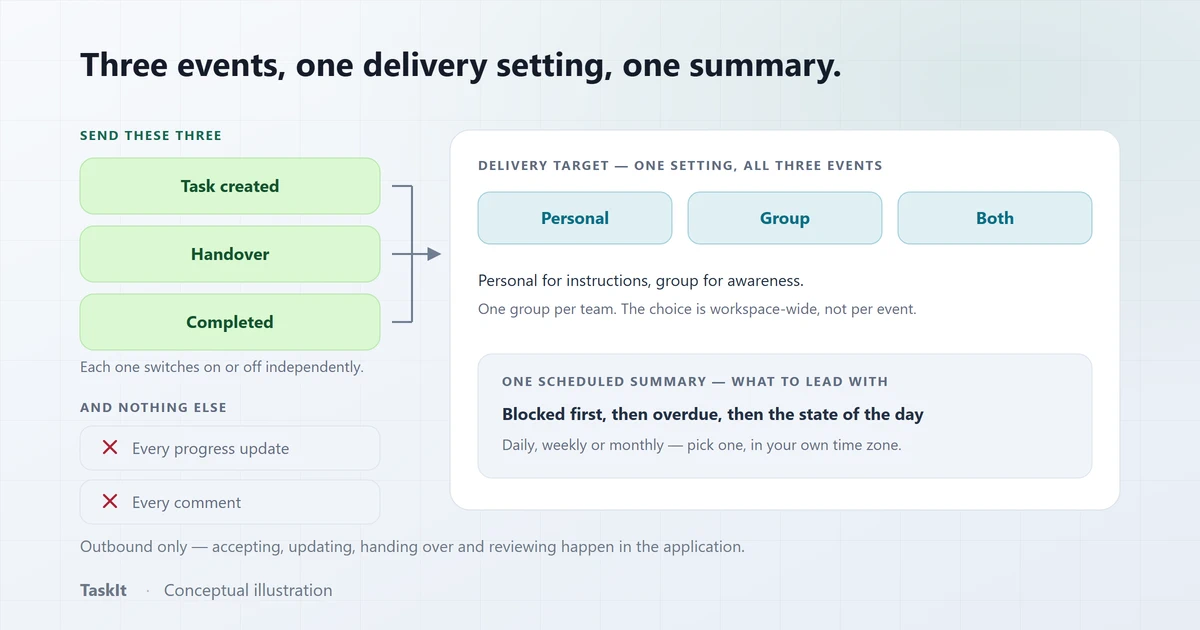
The events that require someone to do something next. In TaskIt those are task creation and assignment, handover, and completion — each switchable on its own.
- Task created or assigned. The message that matters most: someone now has work they did not have a minute ago.
- Handover. The incoming assignee needs to know immediately, because a handover nobody has noticed is an abandoned task. What a handover carries is covered in the task handover process.
- Completion. Useful to the requester and to a supervising group; rarely useful to everyone.
Each of these three can be switched on or off independently in TaskIt, and all of them are gated behind the workspace having WhatsApp enabled at all. Starting with creation and handover only, and adding completion later if people ask for it, is a sensible default. Separately, task alerts can send a reminder a set time before a due date and an alert once it passes — at most five messages per task, held to working hours — and a daily reminder can send each person one list of their pending tasks. The built-in alerts and the daily list start switched off.
Personal, Group or Both
Personal delivery reaches the individual responsible. Group delivery gives a team shared awareness. They answer different needs, and TaskIt lets a workspace choose one or both.
Personal
The message goes to the individual’s own number. This is the default in TaskIt, and it is the right starting point: the person who needs to act gets told, and nobody else is interrupted.
Group
The message goes to a WhatsApp group the workspace has linked. Useful where a team needs shared visibility of what is arriving — a support desk, a shift team, a department that takes work collectively. It is also how unowned department work gets noticed quickly.
Both
The individual and the group. Worth it when accountability sits with a person but the team needs to be able to cover for them; costly if applied to every event, because the group ends up carrying the whole notification volume.
Message templates you control
The default messages are a starting point, not a fixed format. Each event has an editable template with variables for the task’s own data.
In TaskIt each of the three event templates can be rewritten, with placeholders substituted at send time — the WhatsApp task notifications feature page covers the events, delivery targets and scheduled reports in full:
- Task created or assigned — task code, title, priority, due date, who assigned it, who it is assigned to, the description, and a link to the task.
- Handover — task code, title, previous assignee, new assignee, work completed, pending work, notes, due date, and the link.
- Completion — task code, title, who completed the work, who reviewed it where a review happened, and the link.
Answers captured on the task’s custom form can also be inserted into any of the three templates, so a message can carry the fields that matter to your work rather than a generic summary. Optional sections collapse when they are empty, so a handover with no notes does not send an empty "Notes" heading.
Keep templates short
Notification groups
Groups are linked to the workspace deliberately, with a name and a category, so that sending to a group is a configuration decision rather than a per-message one.
A TaskIt workspace links the WhatsApp groups it uses and labels each one — management, HR, sales, IT, operations, support, finance or other — and a group can be marked inactive when it is no longer in use rather than being removed and re-added.
Scheduled task reports
Event notifications tell you what just happened. A scheduled report tells you where things stand — and it is the one people actually read at the end of a day.
TaskIt can send a task report to a linked WhatsApp group on a daily, weekly or monthly cadence, at a time of day and in a time zone the workspace chooses. A daily report can run every day, on weekdays only, or on a chosen set of weekdays; a weekly report runs on a chosen day of the week; a monthly report on a chosen day of the month.
- The message body is a template the workspace can edit, with a preview before it is saved.
- A test send goes out on demand, so nobody has to wait until six o’clock to see what it looks like.
- Delivery history records each attempt, and failed sends are retried.
What WhatsApp does not replace
It is a notification and reporting channel. It is not a second interface to the product, and nothing about a task can be changed by replying to a message.
This is worth stating plainly, because the category is full of claims that blur it. In TaskIt you cannot accept a task, update progress, hand it over, submit it for review, approve it or complete it from WhatsApp. Every message carries a link into the workspace, and those actions happen there — which is also what keeps the task history, the audit trail and the timing data intact.
How the connection works
Each workspace pairs its own WhatsApp number through a self-hosted gateway, so messages come from a number the recipients recognise rather than a shared sender. If that device is disconnected, sends fail — and because a silently failing notification channel is worse than none, every send attempt is logged with its outcome so an outage is visible rather than inferred.
WhatsApp is an optional module
Setting it up well
Start narrow and widen. The failure mode is always volume, and it is much easier to add an event than to win back a group that has been muted.
- Start with Personal delivery only. Individual notifications for creation and handover, nothing else.
- Add a group only where a team genuinely shares work. Departments that take work collectively benefit most — see how to manage tasks across multiple departments.
- Trim the templates. Put the task code, the title and the link in the first two lines.
- Schedule one report. One end-of-day summary to the right group replaces a surprising number of individual messages.
- Check the report’s delivery history after the first week. It shows whether each scheduled report was sent or failed.
The WhatsApp notifications page lists what the WhatsApp capability includes, and the FAQ answers the common questions about pairing and delivery.
Frequently asked questions
Not in TaskIt. WhatsApp is used as a notification and reporting channel: task creation and assignment, handover and completion messages are sent there, each carrying a link to the task. Accepting, updating progress, handing over, reviewing and completing a task all happen in the application.
Task creation or assignment, handover, and completion. Each of the three can be switched on or off independently, and all of them require the workspace to have WhatsApp enabled.
Yes. Delivery can be set to Personal, to a linked WhatsApp Group, or to Both. Personal is the default. Groups are linked to the workspace with a name and a category and can be marked inactive when no longer in use.
Yes. Each of the three event templates is editable, with placeholders for the task code, title, priority, due date, the people involved and a link to the task, plus the handover-specific and completion-specific fields. Answers captured on a task’s custom form can also be inserted.
Yes. A task report can be sent to a linked group on a daily, weekly or monthly cadence at a chosen time in a chosen time zone, using an editable template with a preview and a test send. Delivery history is recorded and failed sends are retried.
Each workspace pairs its own WhatsApp number through a self-hosted gateway, so messages arrive from a number the recipients recognise rather than a shared sender. Every send attempt is logged with its outcome, so a disconnected device is visible rather than silent.
Written by
Dhyey Mehta
All articles by Dhyey MehtaRelated reading
Articles and pages that cover the next question this one raises.
WhatsApp Task Management for Business: A Practical Rollout
The decisions that decide whether WhatsApp notifications get read or muted — volume, targeting, template wording and what to do when delivery fails.
Read article
Task Handover Process: How to Transfer Work Without Losing Context
The difference between a handover and a reassignment, the five things that must move with the work, and a process that survives leave, shift changes and blocked tasks.
Read article
How to Track Employee Task Performance
Four timestamps produce four measurements. What they tell you about a workflow, what they cannot tell you about a person, and how to read them fairly.
Read articleWhatsApp notifications
Pairing, events, delivery targets, templates and scheduled reports.
OpenTaskIt vs WhatsApp groups
Why a thread is a good alert channel and a poor system of record.
OpenPricing
The 30-day trial, per-member pricing and optional modules.
OpenSee how it works on your own tasks
Every capability described above is available during the 30-day free trial.