WhatsApp Task Management for Business: A Practical Rollout
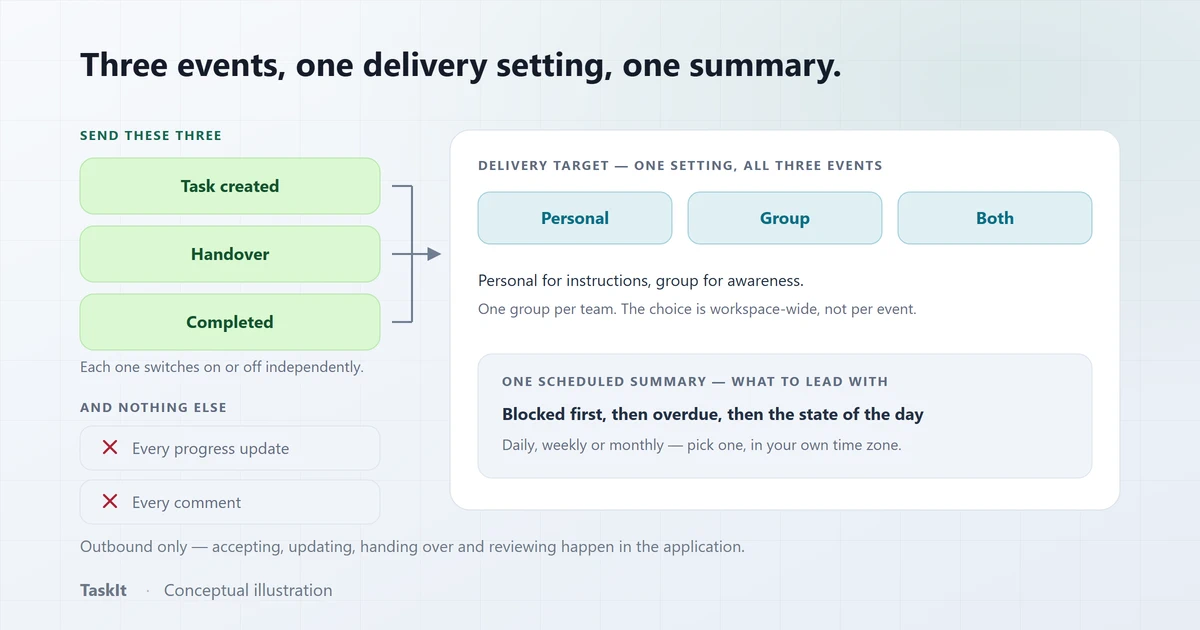
A WhatsApp task rollout succeeds or fails on volume and targeting, not on features. Send the three events that change who has to act — creation, handover and completion — put the operational detail in the message so it can be acted on without opening anything, send instructions to individuals and awareness to groups, add one scheduled summary, and then stop. Teams mute channels that send more than that, and a muted channel is worse than no channel at all.
In this article
Why the channel decision comes before the tool decision
For a large share of operational staff, email is not a channel. If your notifications go somewhere people do not look, adoption stops at the office door.
This is the part that is usually decided last and should be decided first. Field technicians, shop floor staff, salon teams, drivers and shift workers frequently have no work email, share a device, or check an inbox weekly. A perfectly designed task system that notifies by email reaches the managers and nobody else.
WhatsApp solves that completely — everyone already has it, it is already open, and the message is already read. What it cannot do is hold the state of the work, which is why the arrangement that works is a split: WhatsApp is the alert, the task system is the record. TaskIt vs managing tasks in WhatsApp groups sets out that split in full.
What this article assumes
Decide which events are worth a message
The test is whether the message changes who has to do something. If it does not, it is noise, and noise is what gets a channel muted.
| Event | Send it? | Why |
|---|---|---|
| Task created / assigned | Yes | Somebody now has work they did not have a minute ago. |
| Handover | Yes | Responsibility has moved. Both the incoming person and the team need to know. |
| Completion | Usually | Closes the loop for the requester and the group, and removes the reason to chase. |
| Every progress update | No | High volume, low information. This is the single fastest way to get muted. |
| Every comment | No | Turns the channel into a second chat, which is what you were trying to leave. |
| Deadline coming up or passed | Yes, with a limit | A TaskIt task alert reminds before the due date and flags it once it passes, at most five messages per task. |
| A daily list of my pending tasks | Often | One message per person per working day, at a time the workspace sets, instead of one per task. |
TaskIt makes creation, handover and completion independently switchable for exactly this reason — you can start with creation alone and add the other two once the team has stopped noticing them.
Personal for instructions, group for awareness
The two targets do different jobs, and using one for both is the most common configuration mistake.
Personal messages
The reliable one-to-one channel for the person who actually has to act. Nothing is competing for attention, nothing scrolls, and there is no ambiguity about who the message is for. Use it for assignment and for handovers where somebody is receiving work.
Group messages
Shared visibility. This is what makes unclaimed department work get picked up, and what stops a manager having to broadcast separately. It is also what lets a team see that a job is closed without asking. Use it for department work, completions and the daily summary.
Both
Common and often right: the assignee gets the instruction, the group gets the awareness. The risk is doubling your volume — in TaskIt the choice applies to every alert you switch on, so switch on only the events that matter.
One group per team, not one group for everything
Write templates that can be acted on without opening anything
The message should contain enough for the reader to decide whether to act now. If it says "You have a new task", they have to open the app to find out — which is the extra step that stops it being useful.
This is where captured form fields earn their place. If your intake form records the site, the equipment or the order number, the notification can carry them — and a technician can decide from the message alone whether this is the job to go to next.
- Lead with what it is. The task code and title first, so it is scannable in a notification preview.
- Then the deciding detail. Priority, due date, and the two or three fields specific to your work.
- Then who. Who assigned it, or in a handover, who it came from and what they completed.
- Keep it short enough to read in the preview. If the useful part is below the fold of a notification, it is not doing its job.
- Use mentions for the person who has to act, so the message surfaces even in a busy group.
Preview it and send yourself a test before it reaches anyone. TaskIt has both, and using them is the difference between finding a wording problem in your own chat and finding it in the team group.
One scheduled summary, and treat it as the management rhythm
A daily or weekly report that arrives on its own is worth more than a dashboard nobody opens — and it replaces the person who used to type it.
In most small businesses somebody sends a recap at the end of the day. It is genuinely useful, and it stops the week they are away. A scheduled report removes that dependency: it is generated from the records and sent at a set time in your own time zone, whether or not anyone is in.
What to put in it, roughly in order of usefulness:
- Anything blocked. The only part that needs somebody to act tonight rather than tomorrow.
- Anything overdue. Second, because it needs a decision rather than an action.
- What was assigned and what is in progress. The state of the day.
- What was completed. Last, because it is reassurance rather than information — but it is the part people most like reading.
Send it once. A daily report plus a weekly report plus a monthly one to the same group is three messages where one would have done, and the second and third get skimmed. Managing recurring tasks covers the same principle for the work itself.
The failure mode is fatigue, and it is quiet
Nobody tells you they have muted the group. You find out weeks later when work stops being picked up and nobody can say why.
Every notification channel has a volume above which it stops being read, and WhatsApp’s is lower than most because it is shared with the rest of a person’s life. Once a group is muted the channel is not degraded — it is gone, and you have no signal that it has happened.
The practical guards are unglamorous:
- Start with one event and add. Creation first. Add handover a fortnight later, completion after that.
- Count the messages a person receives on a normal day. If it is more than a handful, cut something.
- Never send progress updates or comments. These are the two that generate volume without changing who has to act.
- Split by team. A person should not receive notifications for work they cannot do.
- Ask. Two weeks in, ask three people whether they have muted it. At least one will have, and that is the useful conversation.
The operational things nobody plans for
Delivery is not guaranteed, devices unpair, and numbers change. Knowing what the system does about each is the difference between a channel you trust and one you check manually.
Messages will fail
Networks drop and gateways restart. What matters is whether a failure is retried and whether you can see it. In TaskIt every message goes through a persistent queue with one automatic retry, and each scheduled report keeps a delivery history with status, retry count and error detail — so "did the report go out?" is answerable without asking anyone.
A restart must not lose a broadcast
If messages are sent by a direct call, an interruption halfway through a broadcast loses the remainder silently. A queue with crash recovery resumes instead, which is the difference between a notification system and a notification attempt.
Long reports have to be split properly
A monthly summary can exceed a practical message size. Splitting at arbitrary character counts produces a second part that starts mid-sentence and arrives before the first. TaskIt splits at section boundaries and orders the parts so the second cannot be delivered before the first has sent.
People leave
Keep group membership in step with your team list. A former employee still in the operations group is a small, ongoing information leak that nobody notices because the group looks the same.
A four-week rollout
One change per week, each one small enough that reversing it is easy.
- Week one — pair the number and send tests. Only to yourself and one manager. Get the template wording right where a mistake is private.
- Week two — creation notifications, personal only. The people receiving work start getting it on their phone. Nothing goes to a group yet.
- Week three — add the team group. Department work and completions to the group, so unclaimed work gets picked up and the team can see jobs closing.
- Week four — add the daily report. At a time that suits the end of your day, with blocked and overdue at the top.
And then stop
Frequently asked questions
Creation, handover and completion — the three events that change who has to act. Progress updates and comments should not be sent: they generate the most volume for the least information, and volume is what gets a channel muted.
Both, for different things. Personal messages are the reliable channel for the person who has to act, so use them for assignment and handovers. Groups give shared visibility, which is what makes unclaimed team work get picked up — so use them for department work, completions and the daily summary.
Keep the volume low and the relevance high. Start with one event and add others a fortnight apart, never send progress updates or comments, use one group per team so nobody receives work they cannot do, and ask people two weeks in whether they have muted it — because they will not volunteer it.
In TaskIt, no — it is an outbound channel. Accepting, updating progress, handing over and reviewing happen in the application. That is deliberate: a chat thread cannot be an audit trail, and a task whose state lives in a conversation has no state at all.
It should be retried automatically and the failure should be visible. In TaskIt every message goes through a persistent queue with one automatic retry after a short wait, and each scheduled report keeps a delivery history with the status, retry count and error — so a failed report is something you can look up rather than something you discover when the work is not done.
Written by
Dhyey Mehta
All articles by Dhyey MehtaRelated reading
Articles and pages that cover the next question this one raises.

Task Management with WhatsApp: How Teams Can Stay Updated
Using WhatsApp as a notification channel for task work — which events to send, personal versus group delivery, and the honest limits of the approach.
Read article
How to Manage Tasks in a Small Business
The moment a small business outgrows one person remembering everything, and the smallest structure that reliably replaces it.
Read article
How to Manage Recurring Tasks for Your Team
Why repeating work should be generated by a schedule rather than remembered by a person, and how to review the schedules you are already running.
Read articleWhatsApp notifications
Pairing, events, delivery targets, templates and scheduled reports.
OpenTaskIt vs WhatsApp groups
Why a thread is a good alert channel and a poor system of record.
OpenRemote and field teams
Coordinating people who are never in the office.
OpenSee how it works on your own tasks
Every capability described above is available during the 30-day free trial.