How to Track Employee Tasks Without Micromanaging
Tracking employee tasks without micromanaging means watching the work, not the person. Look at what the work itself records — due dates, overdue tasks, handovers, blocked tasks with their reasons and reopened work — and keep an audit trail both manager and employee can trust. Skip screen time, keystrokes and activity scores.
Task tracking without surveillance
Task trackingIn this article
1. Visibility is not surveillance
Surveillance watches the person. Visibility watches the work. They produce different behaviour.
Monitoring tools track screen time, keystrokes, window focus and location. They answer "is this person at their desk?" — a question that says little about whether the work is moving. The behaviour they produce is performative: keep the mouse moving, keep the status green.
- Task tracking answers "is this work moving, and where is it stuck?".
- The unit you look at is the task, not the person.
- The signals are events the work generates: handovers, due dates, progress updates, completions, reopens.
What TaskIt does not do
2. Four signals that point to real problems
Volume — tasks created, tasks closed — is mostly noise. These four are worth a look.
Overdue work
A growing pile of overdue tasks is usually a capacity signal, not a performance signal: more work is arriving than the team can finish.
Handovers
A task that changes hands again and again was usually given to the wrong place at the start. Someone who receives far more than they hand on may be where unclear work ends up.
Blocked tasks and their reasons
When people can mark a task as unable to complete with a reason — waiting on a vendor, missing information — the reasons show where the process breaks, not who is slow.
Reopened work
Work marked done that comes back usually means the definition of done is weak, or the check before completion is missing. It is rarely only the completer’s fault.
Where these show up in TaskIt
3. The handover is the accountability moment
Accountability is not "did you do it?". It is "here is what I finished, here is what I left, and here is why".
When a task moves from one person to another in TaskIt, the person handing over must state the work completed. Pending work, notes and a progress figure go with it. The task moves to the next person at once, and they accept it when they start. Both sides have a timed record.
- Outgoing person: states what is done (required), what is pending, any notes and the progress figure.
- Incoming person: sees the full context on the task and accepts it to start work.
- The record answers "who had it, what did they finish, what did they leave?" without anyone being questioned.
- If the work stalls later, the record shows where context was lost — not who to blame.
This is different from a status meeting where someone reads out a list. The handover is written once, at the moment of transfer, by the person who holds the context.
4. The audit trail protects both sides
A neutral record is the best defence against "he said, she said".
When someone says "I handed it over on Tuesday" and the other says "I never got it", the record shows the handover, the time, who did it and on which task. No memory required, no chat thread to dig through.
- Read-only: Audit Logs entries cannot be edited or deleted.
- Covers handovers, acceptances, Unable-to-Complete marks, reopens and due-date changes.
- Searchable by person, task code or title, across the whole workspace.
- Each task’s own timeline adds progress updates, comments and status changes.
For the manager, it means not guessing what happened to a task. For the employee, it means not being asked to prove a negative. The record is the shared truth.
5. What to stop measuring
Every metric you add changes the behaviour it touches. These change it for the worse.
- Tasks per day. Encourages cherry-picking small tasks and splitting work artificially.
- Time to first response. Encourages acknowledging without acting.
- Hours logged. Encourages padding. A 30-minute expert fix can be worth more than a 4-hour struggle.
- Logins and activity streaks. Encourage showing up, not finishing.
- Rankings. Turn collaboration into competition — the person who helps others looks "less productive".
6. Rolling it out without the "spyware" conversation
If the team hears "we are installing tracking software", you have already lost. Frame it as "we are fixing the handover problem".
- Start with the pain: "Work gets lost when it moves between people. Let’s fix that."
- Use handovers first. Show how the work-completed field saves the next person an afternoon.
- Introduce the audit trail as the shared reference: "Nobody has to remember who did what."
- Review overdue and blocked work as a team, in a regular review — not in one-to-ones.
- Add WhatsApp messages once the habit has formed in the app.
TaskIt supports this order: handovers work without WhatsApp, and the Audit Logs record from day one.
Frequently asked questions
Watch the work, not the person. Look at overdue tasks, handovers, blocked tasks with their reasons and reopened work, and keep an audit trail as the neutral record. Do not measure hours, keystrokes, screen time or response times.
Task tracking observes the work: handovers, due dates, progress, completions, reopens. Employee monitoring observes the person: screen time, keystrokes, window focus, location, idle time. TaskIt does task tracking only.
A growing number of overdue tasks (a capacity gap), tasks that change hands repeatedly (unclear ownership), blocked tasks and their reasons (process breaks), and reopened work (a weak definition of done).
No. TaskIt does not capture screens, log keystrokes, track idle time or follow anyone’s location. It records what happens to tasks.
The Audit Logs show the handover, the time, who did it and on which task. When one person says "I handed it over" and the other says "I never got it", the record settles it. Entries cannot be edited and can be searched by person, task code or title.
Written by
Esha Mehta
All articles by Esha MehtaRelated reading
Articles and pages that cover the next question this one raises.

Task Handover Process: How to Transfer Work Without Losing Context
The difference between a handover and a reassignment, the five things that must move with the work, and a process that survives leave, shift changes and blocked tasks.
Read article
How to Track Employee Task Performance
Four timestamps produce four measurements. What they tell you about a workflow, what they cannot tell you about a person, and how to read them fairly.
Read article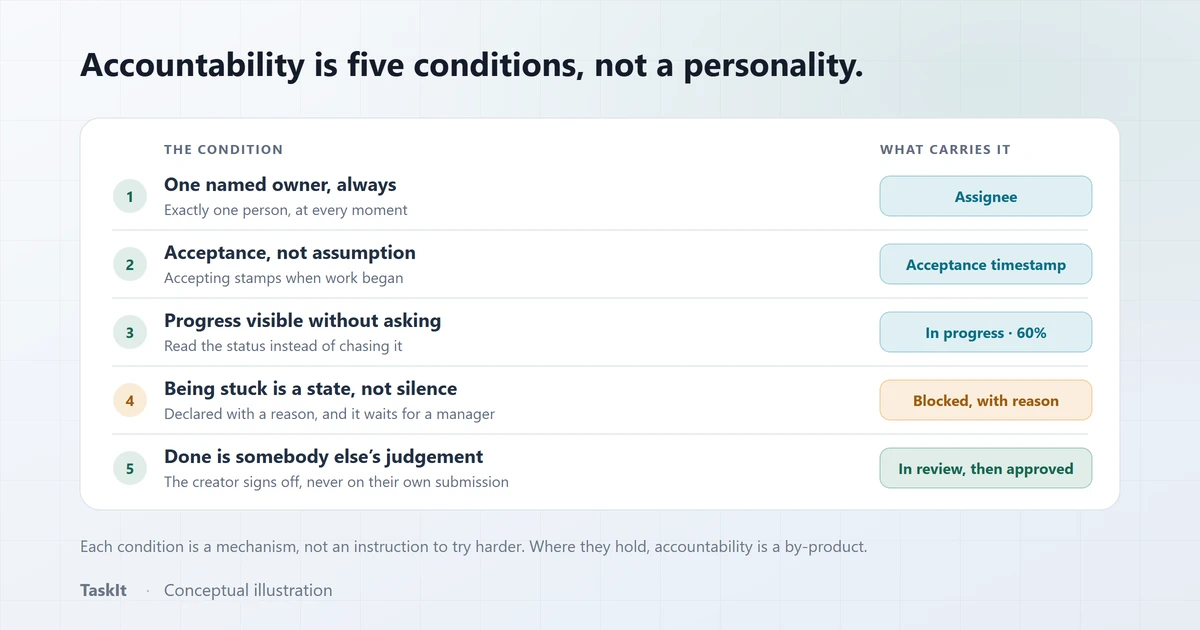
How to Improve Employee Accountability at Work
Why "hold people accountable" fails as an instruction, and the five conditions that make accountability happen without anyone being chased.
Read article
Why Businesses Need an Audit Trail for Task Management
The difference between an activity feed and an audit log, the questions each one answers, and why partial coverage should always be stated rather than implied.
Read article
How to Manage Tasks Across Multiple Departments
Why work stalls when it crosses a team boundary, and how assigning to a department — rather than guessing a name — fixes the handoff.
Read articleTask tracking
Know where every task stands and who has it, without chasing people.
OpenStructured task handovers
What a handover records in TaskIt, and why the task ID never changes.
OpenAudit logs
The read-only record of who did what, on which task, and when.
OpenSee how it works on your own tasks
Every capability described above is available during the 30-day free trial.