Daily To-Do List for Employees: How to Give Every Staff Member a List That Runs Itself
A daily to-do list that runs itself is built from work the system already knows about: recurring tasks that appear on schedule, work handed to you, and anything overdue. In TaskIt, each task can also carry its own To-Do List of steps, and a morning WhatsApp message can list what is overdue and due today — so nobody has to write the list by hand.
Self-running daily lists
Daily task listsIn this article
1. Why "write your daily list" fails
The person who needs the list most is the person least likely to write it.
The new hire, the shift worker, the person juggling three departments — they do not have quiet minutes at 9 AM to plan their day. They start working. If the list is not there when they start, they improvise, and improvisation drops the recurring work and forgets yesterday’s handover.
- Recurring work is invisible to planning. "Check the stock" happens every morning. Writing it daily is waste; forgetting it once is risk.
- Handovers arrive at odd times. If the night shift’s handover is not on the morning list, it is not worked.
- Overdue work goes quiet. A task due Tuesday that slips to Wednesday just sits there unless something brings it back up.
2. The three sources of a self-running list
Almost everything on a daily list comes from one of three places the system already knows about.
Recurring tasks — the rhythm work
Opening checks, daily reports, weekly stock counts, monthly filings. In TaskIt, recurring schedules run daily, weekly, monthly, yearly or every N days, weeks, months or years, on Indian Standard Time, and each run raises a real task with its own due date — nobody copies it across by hand.
Work handed to you
When a colleague hands a task over in TaskIt, it moves to you with what they completed, what is pending, their notes and the progress figure. You accept it when you start, and you do not have to ask "what did you already do?".
Overdue work
Anything past its due date stays on the list until it is done, handed over, marked unable to complete or reassigned. TaskIt’s Tasks page has an Overdue filter, so it is one tap to see.
3. The To-Do List inside each task
A daily task like "open the store" is really eight small steps. Those steps belong on the task.
In TaskIt, an admin can add a To-Do List question to a task form and set default items — "lights and AC on", "cash counted", "display checked". Every task created from that form starts with those items, so the steps are the same every day without anyone typing them.
- People tick items off as they go, so anyone can see how far the work has got.
- A person can add a note to an item, signed with their name — "AC remote missing, told the manager".
- The task still has one owner and one due date; the To-Do List is the steps inside it.
Checklist or to-do list?
4. The morning list on WhatsApp
A list in an app the person opens at 10 AM does not help a 7 AM shift.
With the WhatsApp add-on (₹499 a month, free during the trial), an admin can switch on TaskIt’s Daily Pending Tasks Reminder. On working days, at a time the workspace chooses, each person gets one WhatsApp message listing their open tasks — overdue first, then what is due today — with a link to their Tasks page.
- One send time for the whole workspace, chosen in half-hour steps (for example 08:00).
- Up to 15 tasks per message, each with its task code, title and due note.
- The admin chooses what it includes: all open tasks, or only overdue and due today.
- It reaches any phone with WhatsApp, before anyone has opened TaskIt.
5. On the phone they already have
No app store, no large download.
TaskIt runs in the phone’s browser and can be added to the home screen like an app. It needs a data connection; the morning WhatsApp message covers the time before anyone opens it.
6. The one human habit: a short weekly review
Automation catches the known work. A 15-minute review catches what it missed.
- Open Tasks and turn on the Overdue filter. Anything more than a week overdue: finish it, hand it over, mark it unable to complete, or ask for it to be reassigned.
- Check the tasks you handed over this week. Has the next person started? If a handover stalled, follow up.
- Look at the recurring schedules you rely on. Do the steps in their To-Do Lists still match the work?
This is not a planning meeting. It is a quick tidy-up — 15 minutes, once a week. The list runs itself the rest of the time.
7. What the manager looks at instead
The manager does not need to read everyone’s list. They need to see where work is stuck.
- Filter Tasks by department and turn on Overdue to see where work is piling up.
- Look at blocked tasks and their reasons — they show where the process breaks.
- Read a task’s timeline instead of asking "what happened?" in a meeting.
The conversation shifts from "did you do it?" to "what is blocking this?".
Frequently asked questions
Build it from work the system already knows about: recurring tasks that appear on schedule, work handed to you, and anything overdue. In TaskIt, To-Do List items on each task carry the steps, and the Daily Pending Tasks Reminder can send each person their list on WhatsApp in the morning.
Recurring work due today, work handed to you, and anything overdue — each with a clear next step. Ideas and loose requests belong somewhere else until they become a task with a due date.
With the WhatsApp add-on, an admin switches on the Daily Pending Tasks Reminder and picks one send time for the workspace. On working days each person gets a message listing up to 15 open tasks, overdue first, with a link to their Tasks page.
Yes. Add a To-Do List question to the task form and set default items. Every task created from that form starts with those items, and people tick them off — with signed notes if something needs explaining.
No. TaskIt runs in the phone’s browser and can be added to the home screen like an app. It needs a data connection.
Written by
Esha Mehta
All articles by Esha MehtaRelated reading
Articles and pages that cover the next question this one raises.
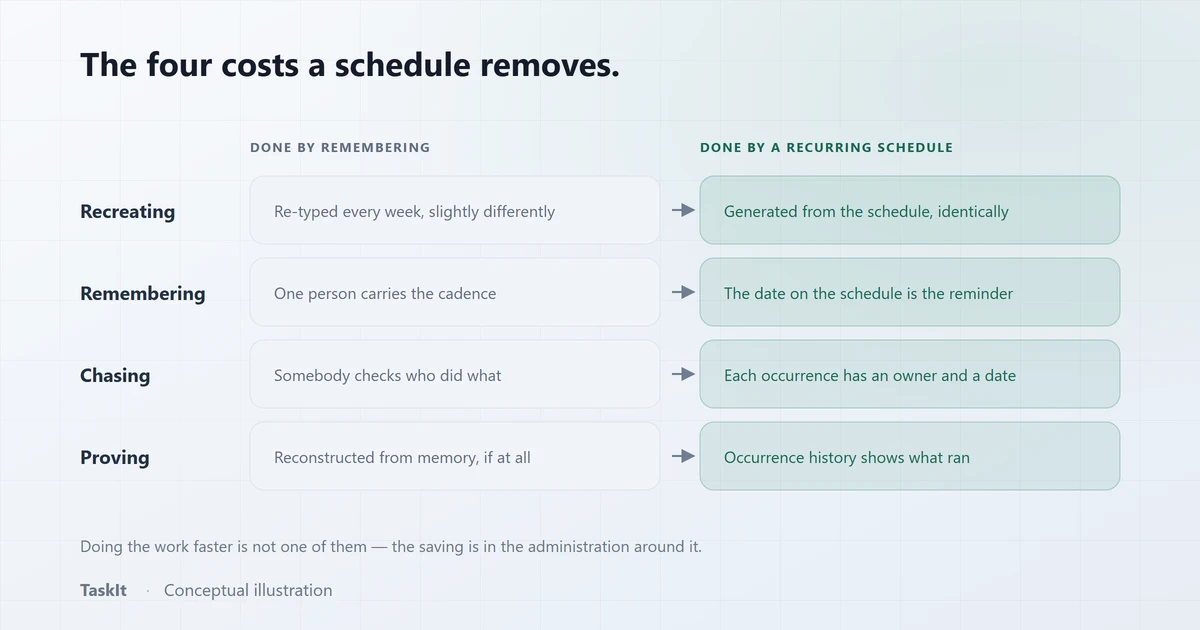
How Recurring Tasks Save Time (and Stop Work Going Missing)
The real cost of repeated work is not doing it — it is the recreating, remembering and proving around it. All three are removable.
Read article
Task Handover Process: How to Transfer Work Without Losing Context
The difference between a handover and a reassignment, the five things that must move with the work, and a process that survives leave, shift changes and blocked tasks.
Read article
How to Track Employee Task Performance
Four timestamps produce four measurements. What they tell you about a workflow, what they cannot tell you about a person, and how to read them fairly.
Read article
Task Management with WhatsApp: How Teams Can Stay Updated
Using WhatsApp as a notification channel for task work — which events to send, personal versus group delivery, and the honest limits of the approach.
Read article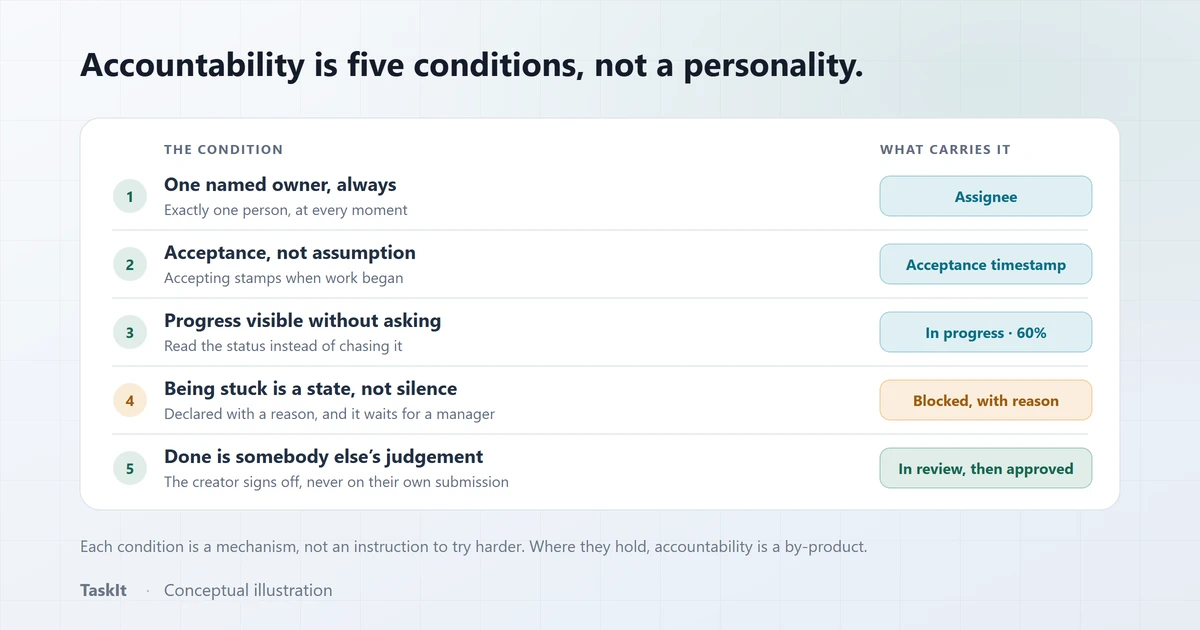
How to Improve Employee Accountability at Work
Why "hold people accountable" fails as an instruction, and the five conditions that make accountability happen without anyone being chased.
Read articleTask checklists
The To-Do List inside a task: default items, ticks and signed notes.
OpenRecurring tasks
Schedules that raise the same task on Indian Standard Time, every time.
OpenWhatsApp notifications
Task messages and the morning reminder, sent from your own number.
OpenSee how it works on your own tasks
Every capability described above is available during the 30-day free trial.